Submitting a Proposal
Log into the Submission System
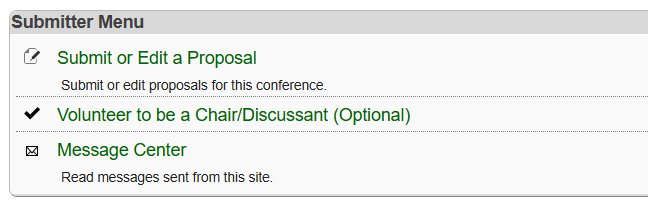
First, log into the proposal submission system using your APSAnet.org username and password. Then, select “Submit or Edit a Proposal” to begin your submission.
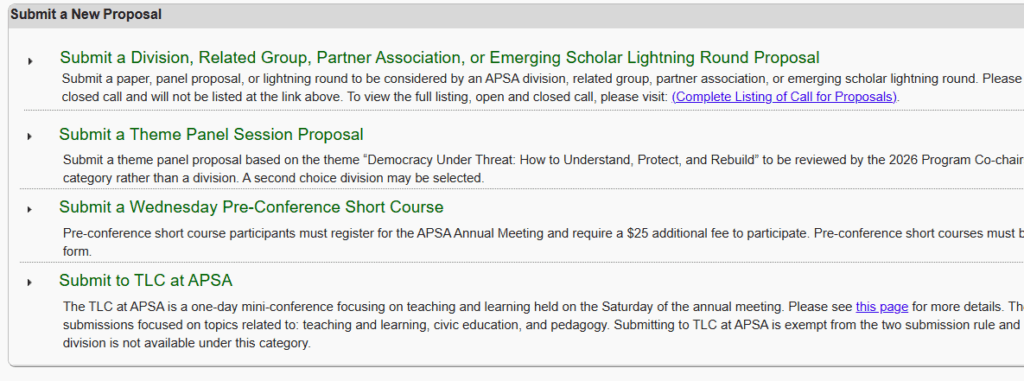
Submitting a New Proposal
Choose “Submit a Division, Related Group, Partner Association, or Emerging Scholar Lightning Round Proposal” to submit a paper, panel, or lightning round proposal for consideration by an APSA division, related group, partner association, or the Emerging Scholar Lightning Rounds.
To submit a proposal based on the 2026 theme, “Democracy under Threat: How to Understand, Protect, and Rebuild,” for consideration by the program co-chairs, select “Submit a Theme Panel Session Proposal.” Please note that theme panel proposals must choose “Theme Panel” as the first choice category. You cannot select “Theme Panel” as a second choice option, though you may add a division or related group as your second choice.
You may also submit a Wednesday Pre-Conference Short Course (full-day or half-day) or a TLC at APSA proposal. These proposal types do not count toward the two-proposal submission limit.
Once submitted, proposals can be edited at any time before the deadline by returning to “Submit or Edit a Proposal” under the Submitter Menu, navigating to the “Submissions” tab, and selecting “Edit” in the far-right Action column next to the proposal you wish to modify.
Submission Deadline
All proposals (including short courses) must be submitted by Wednesday, January 14, 2026, at 11:59 p.m. Pacific. View all submission options here ››
Quick Tips
Once you log into the submission system, you will have one hour (60 minutes) to complete your submission. A timer will be displayed in the upper right-hand corner to show your remaining time. As partially completed proposals cannot be saved, we recommend submitting what you have if you need more time. You can return to edit your proposal at any point before the submission deadline of Wednesday, January 14, 2026, at 11:59 p.m. Pacific.
- Avoid using your web browser’s “Back” button. Instead, use the “<< Back” button at the top right of page.
- Each page includes its own instructions – be sure to read them thoroughly.
- Your progress is not saved until you click “Accept and Continue” at the bottom of each page/step.
- After reviewing your submission information on the final page, click “Save and Submit.” You should then receive a confirmation email. To resend this email, open your submission, select “Edit,” and check the “Resend Confirmation” box next to “Save and Submit.”
- Please be sure you receive a confirmation email from do_not_reply@allacademic.com before exiting the system.
- You must have an APSA account to submit a proposal. If you do not already have one, you can create a free account here: www.apsanet.org/Registration
- Remember, the proposal submission deadline is Wednesday, January 14, 2026, at 11:59 p.m. Pacific.
Guidelines and Instructions
Submission Procedures
APSA accepts a wide range of proposal types. To learn more about the session formats and submission options, visit the Submission Options page.
To use the online proposal submission system, you need a valid email address, an APSAnet.org account, and an internet connection. If you don’t yet have a free APSA account, you can create one here. You are not required to be an APSA member to submit a proposal.
Submission Rules
The following submission rules were established by the APSA Committee on the Annual Meeting:
- You may submit up to two proposals. Additional proposals from the same author or organizer will not be accepted. Others may submit you for additional roles, but it’s recommended that your name appear on no more than four proposals total. This helps reduce last-minute withdrawals due to participation limits or over-committing.
- Pre-Conference Short Courses, TLC at APSA, and Emerging Scholars Symposium Lightning Rounds are exempt from the two-submission limit. (This exemption does not apply to Division or Related Group Lightning Rounds.)
- Each proposal may be submitted to no more than two divisions, related groups, or partner associations.
- All paper proposals will also be considered for iPoster presentation.
- All proposals must be submitted by Wednesday, January 14, 2026, at 11:59 p.m. Pacific.
Confirmation of Proposal Submission
After submitting your proposal, you’ll receive a confirmation email and a unique submission ID number. Please save both for future reference. If you don’t receive a confirmation email within 24 hours, contact meeting@apsanet.org for assistance.
You can view, edit, or delete your submission any time before the deadline by going to “Submit or Edit a Proposal” in the Submitter Menu, navigating to the “Submissions” tab, and selecting “Edit” or “Delete” in the far-right Action column next to your proposal.
Acceptance Notifications
In early March 2026, all submitters will receive an email confirming whether each proposal was accepted or declined. If your proposal is accepted for a panel or poster presentation, the email will specify the division for which it was accepted.
If your proposal is not immediately selected for a panel or poster session, your division chair(s) may reach out to you at a later date if space becomes available on the program. Division or panel chairs will provide further details about session format, scheduling, and participation requirements once assignments are finalized.
If your paper or panel proposal is accepted, you will be required to formally confirm your planned participation in the 2026 Annual Meeting.
APSA reserves the right to select or remove panels and participants and to modify the date, time, or format of any panel or presentation at its sole discretion.