
We’re excited to welcome you to our second annual virtual conference, taking place online on Thursday, April 10 and Friday, April 11! Before attending the 2025 APSA Virtual Research Meeting, please be sure to review the participation tips, resources, and guidelines below.
If attending or participating in the 2025 APSA Virtual Research Meeting, please note the following:
- Registration Required: All attendees must be registered to view session details and access Zoom links.
- Upload Your Paper: Authors should upload their paper to the submission system and share it with their discussant(s) and fellow panelists at least two (2) weeks before the virtual meeting. This allows panelists to review your work in advance and helps attendees decide which sessions to attend.
- Authors are also encouraged to upload their paper to APSA Preprints, APSA’s free pre-publication platform for early research outputs in political science and related disciplines. Uploading your paper to APSA Preprints allows you to share your work with peers, obtain a DOI, gather feedback, track metrics, and prepare for journal submission.
- Research Group participants should contact their workshop organizer(s) directly to share any documents or materials in advance.
- Code of Conduct: All attendees should take a moment to review the APSA Code of Conduct prior to the virtual meeting.
- Zoom Hosts & Session Access: Panel chairs and Research Group organizers will serve as Zoom hosts for their sessions. An APSA staff member will join each Zoom room 10–15 minutes before the scheduled start time to assign hosting permissions. If a chair is unavailable, the host role will be assigned to a discussant or panelist. Chairs, discussants, and Research Group organizers should log in 10–15 minutes early to ensure the session has a host and begins on time.
- PowerPoint Presentation: If you plan to use slides during your presentation, be sure they are prepared in advance. Download the PowerPoint template here.
- Time Zone & Session Time: Confirm the date and time of your session(s) in advance, especially if you’ll be participating from outside the U.S. Eastern Time Zone. We also recommend checking ahead of time whether you’ll need a VPN to access Zoom from your location.
- Questions? Review the 2025 Virtual Research Meeting Participant Guide or email us at meeting@apsanet.org.
Volunteer as a Chair or Discussant
Support your fellow scholars by volunteering as a panel chair or discussant! If you’d like to serve on a specific panel or focus on a particular topic, please indicate that on your form.
Volunteer to be a chair or discussant »
Download the Virtual Participant Guide
The participant guide includes information on navigating and joining panel sessions, virtual presentation tips, and what to expect before and during the online meeting.
Download the Virtual Participant Guide »
Accessing the Virtual Platform
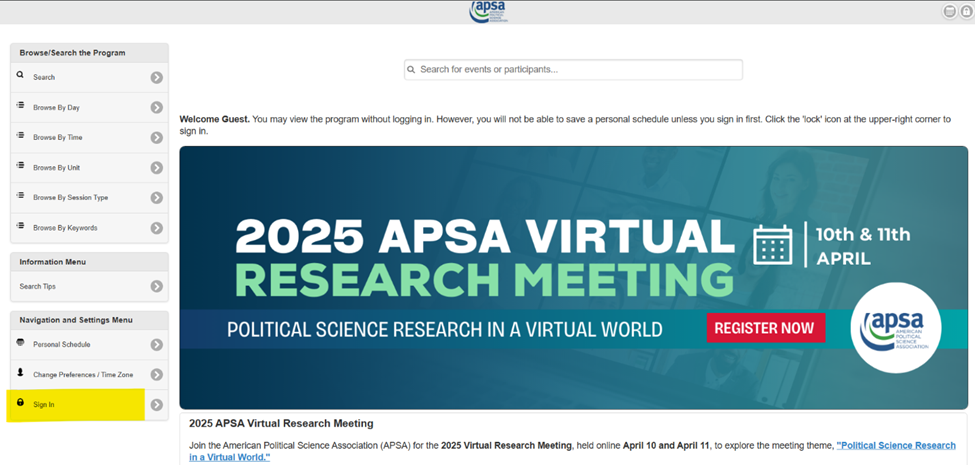
All virtual panels, Research Group workshops, and keynote sessions will be accessible through the All Academic online program. To log in, click “Sign In” on the left-side menu of the program homepage and enter your MyAPSA username and password.
- Test your APSA credentials before the meeting to ensure you can access the platform without issues.
- To view session details, participant contact information, and Zoom links, you must be registered for the meeting and logged into the online program. If the top of the homepage says “Welcome Guest” instead of your name, you are not logged in.
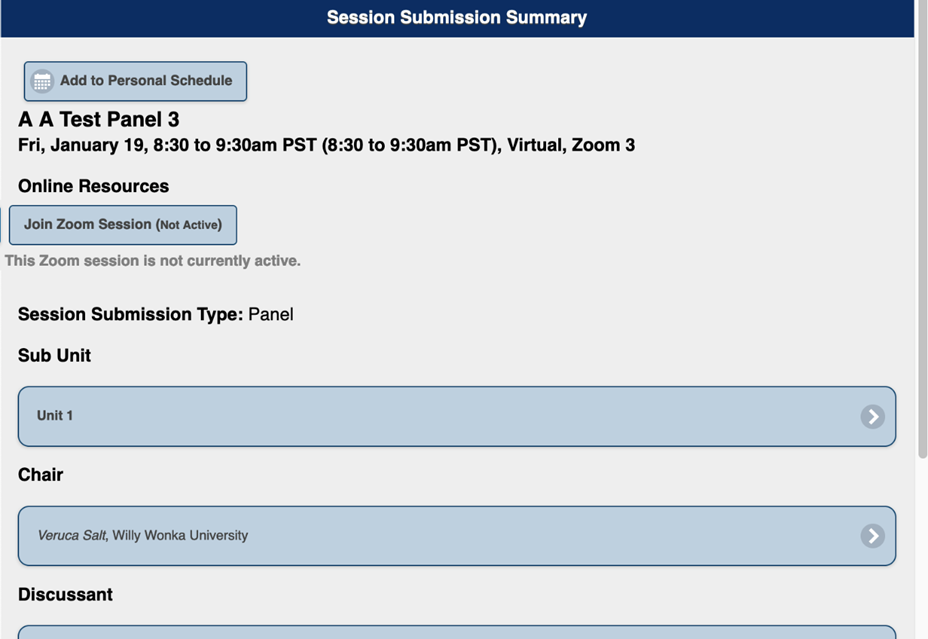
- Zoom links will be available to registered participants on the day of the scheduled session and will only become active 15 minutes before the scheduled start time.
Joining Zoom Sessions
To view session details, participant contact information, or access Zoom links, you must be registered for the meeting and signed into the online program using your APSA account login credentials. Once signed in, use the search tools to find sessions. Attendees can:
- Adjust the program to your local time zone
- Search by session name or keyword
- Filter by session type, date, time, and more
Click on a session to view full details. If you’re registered for the meeting and logged in, a “Join Zoom Session” button will appear at the top of the session page. This link will become active 15 minutes before the session’s scheduled start time.
Technical Support
During meeting hours, the fastest way to get assistance is through the Technical Support Chat, available from the left-side menu of the online program homepage. You must be signed into the program to access this feature. Outside of meeting hours, please contact us at meeting@apsanet.org.
To prevent session disruptions, please do not share any Zoom links on social media.
Additional Support
Meetings Questions: meeting@apsanet.org
Login or Membership Questions: membership@apsanet.org
Other Best Practices for Presenters and Participants:
- An APSA staff member will join the Zoom room to assign hosting permissions to the panel chair or Research Group organizer. If a chair is not available, a discussant or panelist will be made host. Chairs, discussants, and Research Group organizers should join 10–15 minutes early to confirm they have no technical issues and ensure the session begins on time.
- Silence or power off your phone and other devices. Mute your microphone when not speaking to reduce background noise and audio feedback.
- Make sure your camera is at eye level and look into the camera when speaking to maintain eye contact with the audience. If delivering formal remarks, rehearse on camera to review your delivery.
- If you’re presenting, be sure to have water nearby.
- Avoid busy or brightly patterned backgrounds and clothing.
- Keep any slides simple and focused; they should complement your talk, not replace it. Only the Zoom host (usually the panel chair) can grant screen sharing access, so please notify your chair in advance if you’ll need to share your screen.
- Stay within your allotted time to ensure all participants and audience Q&A are accommodated.
- Briefly reiterate earlier points if an attendee joins late.